


2022
Data dashboard for people records
Person 360 dashboard for CSMs to view consolidated person level info helping them to prepare for meetings, track usage, and manage follow-ups
Role and responsibility
-
Led end-to-end UX design from research to final solution
-
Collaborated closely with PMs, engineers, and QA to define scope, MVP flows and quality.
Skills
Data visualization, User research, Interviews, Feature requirement workshops, UX audit, competitor research, flow diagrams, wireframing, user interface design, rapid prototyping
TL;DR Version
~2 minutes read

Context
At Gainsight, accessing individual user data across multiple sources was fragmented and time consuming, making it difficult for Customer Success Managers to gain a complete view of each user.

Goal
Create a unified Person 360 view that brings together all individual level data such as usage, sentiment, and interactions into one actionable interface.

Research & Process
-
Research: User interviews with Customer Success Managers and competitor analysis of Totango and Planhat
-
Define: Problem statement, persona, MVP scope, and information design
-
Design: Iterative wireframes to interactive prototypes with stakeholder reviews
-
Deliver: Final feature built on Customer 360 patterns for design consistency

Solution Highlight
-
Unified person profile with contextual data
-
Quick action bar for instant tasks
-
Health score and analytics center for proactive insights
-
Labels and grouping for digital customer success automation
-
Note taking and persona based layouts for flexibility

Impact
-
Delivered Gainsight’s first individual-level 360.
-
Improved efficiency in prep, follow-ups, and usage analysis.
-
Onboarded high value client
-
Positioned for strong adoption in enterprise accounts
-
↑ User adoption by success and sales teams
-
Improved NPS from CS teams using the new dashboard


Detailed Case study
About Gainsight
Gainsight is a customer success platform that helps businesses keep customers, grow revenue, and strengthen relationships.

Gainsight is a data driven customer success platform that helps businesses act on customer insights. While it offered company level insights through Customer 360, users needed similar visibility at the individual level. Person 360 was built to provide person specific insights for deeper understanding and personalized engagement.
Who is this for?
Customer Success Managers & CS Ops / Admins (primary) + Sales, Product, Support (secondary)
Process
1. DISCOVERY
2 weeks
Users
User Tasks
Pain Points
Gainsight 360
Competitors 360
Information Design
2. DEFINE
1 weeks
Problem Statement
Persona
MVP Feature List
Design Constraints
Feature Outline
3. DESIGN
2 weeks
Brainstorming
Concept Design
User Feedback
New Components
Final Design
Interactive Prototype
4. DEV SUPPORT
Engineering Refinement
High Fidelity Designs
Prototypes
Dev Support
Process
1. RESEARCH & DISCOVERY
My research methodology centred on comprehending user behaviours, daily tasks, and challenges. I conducted direct interview sessions to gain insights into their routines, identifying shortcomings in the current design. Additionally, I probed for their ideal solutions. I also conducted a thorough analysis of our key competitors like Planhat and Totango to discern their approaches to addressing and resolving similar issues.
PRIMARY USER
Customer Success Managers
Role: Customer Success Managers (CSMs) are professionals responsible for ensuring that customers achieve success and derive maximum value from the products or services provided by a company. Their primary goal is to foster long-term relationships with customers by understanding their needs, addressing concerns, and helping them effectively utilize the product or service to meet their goals.
USE CASES IDENTIFIED
Use Case 1:
Periodic Check-In Preparation
As a Customer Success Manager (CSM), I am preparing for a scheduled check-in with Customer Success stakeholders. To ensure a productive meeting, I need to:
-
Review previous meeting notes to create a to-do list for updates.
-
Check for any new requests or tickets raised by stakeholders through the community or other channels.
-
Assess the customer's overall health status since our last meeting.
Use Case 2:
Adding New Stakeholder Details
As a Customer Success Manager (CSM), I've encountered a new stakeholder during a meeting. To maintain comprehensive records for future interactions, I aim to:
-
Capture and input the new stakeholder's details into the Person profile page for reference in upcoming engagements.
Use Case 3:
Evaluating Low Usage of a Power User
As a Customer Success Manager (CSM), I've noticed decreased usage from a power user in a premium product. To address this issue effectively, I aim to:
-
Evaluate the user's activity and additional data points to understand the reasons behind the decreased usage.
-
Identify areas of focus for a conversation with the user to improve their engagement.
Use Case 4:
Sending Follow-Up Email after Meeting
As a Customer Success Manager (CSM), I need to promptly follow up after a meeting. To streamline this process, I aim to:
-
Quickly send an email to a contact from the P360 touch point after the meeting concludes, ensuring efficient communication.
Use Case 5:
Context-Based Email Sending from P360 Touch Point
As a Customer Success Manager (CSM), while researching a contact, I want to send a contextually relevant email from the P360 touch point based on important action items. I aim to:
-
Send an email based on critical action items identified from Timeline entries or changes in the Person score and other relevant data points associated with the contact.
PAIN POINTS
-
Not able to access and assess background/engagement/usage information regarding the person
-
Not able to carry out actions based on insights
-
Being able to see important information upfront
-
Make notes before meetings, create questions
-
Create custom attributes such as hobbies, gifts and pets
-
See a person's health score and assess areas of improvements
-
Get analytical alerts in profiles such as usage dips
UNDERSTANDING 360'S
GAINSIGHT CUSTOMER 360
Gainsight's Customer 360 (C360) is a central hub of a customer’s business information in Gainsight. It synthesizes business data from various sources and provides users with a holistic view of their customers at a company level. Person 360 would be a 360 view at an individual level. The structure of both the 360's will be kept the same to maintain consistency.

PROS
-
Gainsight Customer 360 provides a comprehensive and centralized view of customer data, allowing businesses to understand and manage their customers more effectively.
-
High customization capabilities.
CONS
-
Integrating diverse data sources creates complex information architecture that is not visually coherent and easy to understand.
-
The visual design and design patterns look outdated.
TOTANGO CUSTOMER 360
Totango's 360 feature too emphasizes a customer-centric approach, providing a deep understanding of customer behaviour, preferences, and engagement patterns, allowing businesses to tailor strategies accordingly. The 360 feature automates customer health monitoring, offering proactive insights into potential issues or opportunities, and allowing design teams to create responsive and targeted interventions.

PROS
-
Totango's 360 feature provides more organised data comparatively easier to synthesise and understand
-
Visually lighter and simpler UI, doesn't overwhelm the user
CONS
-
While offering a range of features, Totango's 360 has limitations in terms of extensive customization, potentially restricting customers from tailoring the interface to match specific branding or workflow requirements.
PLANHAT CUSTOMER 360
Planhat Customer 360 uses their Customer Data Platform that allows one to structure, manage and interact with their customer data. One can dive into the conversations, notes, check out license data, activity data, or anything else related to that customer.

PROS
-
Planhat Customer 360 has a lot more visually rich style helping users identify weak spots in the overall metrics very quickly.
-
Provides a sidebar that gives quick info about the customer
CONS
-
Planhat C360 doesn't provide panel customization and user persona-based viewing permissions.
-
Wide and long widgets consume too much space without providing adequate information.
2. DEFINE
Armed with a profound comprehension of user behaviours and a thorough analysis of existing market offerings, our next strategic move involved the meticulous definition of both scope and features. This crucial step in the development process ensured that our product aligns seamlessly with user preferences while also addressing gaps and opportunities identified in the competitive landscape.
REVISED PROBLEM STATEMENT
What strategies can be implemented to facilitate Customer Success Managers (CSMs) in comprehensively interpreting individual-centric data, enabling informed decision-making, while also providing functionality to incorporate key metrics, custom notes, and groupings for enhanced data management?
GOALS
-
To give a unified view of a person’s footprint across the different suites of GS products.
-
To aid Digital CS by allowing admins to create cohorts of persons and schedule automated communication with them.
-
Enable the inclusion of personalized metrics and notes for enhanced customization and insights.
PERSONA
Following market and user analysis, I proceeded to create foundational user personas. These personas serve as crucial reference points throughout the design process, encapsulating key user characteristics. By having these personas at the forefront, our team ensures a user-centric approach at every design stage, tailoring features and experiences to meet the diverse needs and preferences identified within the defined user archetypes.


MVP FEATURE LIST
Subsequent to a thorough competitive analysis, I proceeded to outline the Minimum Viable Product (MVP) features. Leveraging insights from comparable products like Planhat and Totango, this strategic move involved distilling essential functionalities. Focusing on key features identified through this analysis, the MVP stage prioritizes the delivery of core elements that align with user expectations and address market gaps. This approach ensures a lean yet impactful initial product release, laying the foundation for iterative enhancements.


Through a collaborative effort, we organized internal and external Customer Success Manager (CSM) workshops to distil the most valuable features for the Minimum Viable Product (MVP). These sessions facilitated a comprehensive understanding of user needs and expectations. Resulting of the workshops, we categorized features into "must-haves," "should-haves," and "nice-to-haves," creating a prioritized roadmap. This approach ensures the MVP aligns closely with essential user requirements, providing a solid foundation. The collaborative workshops refined our feature set and fostered a sense of ownership and engagement among internal and external stakeholders in shaping the product's success.
3. DESIGN
BRAINSTORMING & CONCEPTS
Initiating the design process, we leveraged our established Customer 360 pattern for feature consistency, ensuring a seamless user experience. Exploring innovative out-of-the-box components, we aimed to tailor the interface to suit diverse customer workflows. This approach not only maintained a cohesive design language but also allowed for flexibility, providing customers with an optimized and familiar interaction model. By incorporating proven patterns and considering user workflows, our initial concepts aimed to strike a balance between consistency and adaptability for an enhanced and user-friendly product experience.


SOLUTION OUTLINE
While working on the design, we gathered a set of features that specifically matched the situations we identified for users. Our focus was on making sure these features addressed users' needs effectively. By aligning closely with the outlined use cases, we aimed to create a product that suits users' expectations and enhances their experience. This step-by-step approach helped us refine and prioritize features based on their relevance to what users actually need.
A. QUICK INFO ACTION BAR
Responding to customer feedback, I proposed a new component – a sidebar that keeps essential and actionable information easily accessible by pinning it to the top or side. This feature incorporates quick actions and customer attributes, streamlining user interactions and ensuring key details are readily available for a more efficient and user-friendly experience.


I investigated both horizontal and vertical formats for the quick action bar, collaborating with product leaders to determine the most practical implementation approach. This exploration aimed to find the optimal design that balances functionality and feasibility, ensuring a seamless integration of the quick action bar into the product interface.

B. PERSON HEALTH SCORE
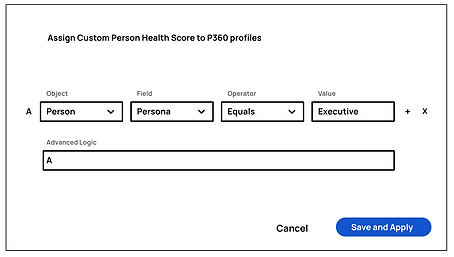
Following this, I suggested an automated person health scoring system for gauging user interactions and customer health using straightforward metrics. In the MVP, the system will initially be manual, allowing users to assess health. We took into account parameters like usage engagement and sentiments to provide a comprehensive evaluation of the person's health within the system. This approach aims to automate and simplify the health scoring process, enhancing user insights and decision-making.



C. ANALYTICS AND ACTION CENTRE
I recommended the implementation of an analytics and action centre. This feature would automatically detect issues and health score dips within the system, alerting Customer Success Managers (CSMs) and providing actionable insights to address the identified issues promptly. This proactive approach aims to enhance the platform's capability to identify and address potential challenges, enabling CSMs to take timely actions and maintain customer health effectively.


The widget metrics were purposefully designed to offer meaningful insights to Customer Success Managers (CSMs). Each metric was tailored to provide CSMs with valuable and actionable information, ensuring that the data presented through the widgets is relevant, clear, and directly contributes to their decision-making processes. This approach aimed to enhance the overall utility of the widgets, aligning them closely with the specific needs and priorities of CSMs for more effective customer management.

D. LABELS AND GROUPS
To streamline user management, the introduction of labels and groups was proposed. Labels allow for categorizing users with shared traits, facilitating targeted actions. Additionally, groups provide an organized way to perform actions on sets of users with similar characteristics. These features, especially the use of tags, are envisioned to significantly support digital customer success initiatives by enhancing the ability to efficiently organize and engage with specific user segments.


E. PERSON BASED LAYOUTS
Continuing the enhancements, a persona-based layout was suggested to cater to different admin profiles. For instance, power users would have a layout emphasizing usage metrics, while executive profiles would focus more on communication and sentiment-related metrics. This tailored approach ensures that administrators receive information most relevant to their roles, enhancing the efficiency and relevance of the dashboard for diverse user personas.

F. QUICK NOTES
I recommended the incorporation of a note-taking tool to support CSMs in gathering and saving thoughts. This tool facilitates collaboration by allowing CSMS to share insights, ensuring seamless handovers. The note-taking feature aims to enhance communication and knowledge transfer among the CSM team, promoting a more cohesive and informed approach to customer management.

FINAL DESIGNS
Taking feedback and undergoing multiple iterations, the final design features a horizontal top bar. This design ensures that the most relevant information is easily accessible at all times, optimizing user experience by providing efficient access to key functionalities and data. The screen below shows an additional mailing feature to keep track of the communication in a 3rd pane modal.


Custom widgets were designed for all Gainsight integration products, adhering to a grid system. This approach ensures a standardized and organized layout for the widgets, facilitating a cohesive and visually appealing integration across different Gainsight products. The use of a grid system enhances consistency, making it easier for users to navigate and understand the placement of custom widgets within the interface.
The top bar is tailored to display distinct information modal instances based on different user profiles within the Gainsight product. This customization ensures that each user sees pertinent information aligned with their role and preferences, optimizing the user interface for a more personalized and efficient experience.

Following this, the setup and customization panels were designed, leveraging pre-existing patterns from C360. These panels assist administrators in efficiently configuring P360 profiles for individual users. By incorporating established design patterns, the aim is to ensure consistency across the platform, making it intuitive for admins to navigate and personalize profiles according to the specific needs of each user.


INTERACTIVE PROTOTYPING
Comprehensive prototypes were meticulously developed to facilitate a smooth transition of the design to the development team. These prototypes encompass detailed user journeys and micro-animations, ensuring a nuanced representation of the intended user experience. Additionally, the prototypes served a dual purpose, being instrumental in stakeholder presentations at various stages of the design process, fostering a shared understanding and garnering valuable feedback for further refinement.

4. DEVELOPMENT
PLANNED FOR Q1 RELEASE
After extensive coordination with engineers, Person 360 is poised for release in Q1 2024, anticipated to significantly enhance Gainsight's product offering. This feature is particularly appealing for B2C customers, offering a closer monitoring of their users. Moreover, it is expected to strengthen customer retention among high-value enterprise clients, as this unique feature currently stands unparalleled in the market, providing a distinctive advantage over competitors. The strategic introduction of Person 360 is forecasted to bring substantial value to Gainsight's overall product proposition.
NEXT STEPS
Post-release, we aim to gather customer feedback to identify and prioritize features for subsequent releases. This prioritized list will encompass a combination of features that didn't make it to the MVP stage and those directly requested by customers. This iterative approach ensures a responsive development cycle, aligning the product closely with user needs and evolving market demands. The feedback-driven feature prioritization aims to continuously enhance the product based on real-world user experiences and preferences.
Challenges
-
Designing a unified view for multiple data sources across products
-
Aligning different internal teams (CS, sales, product) on shared data needs
-
Managing information overload while keeping clarity in the UI
-
Creating scalable layouts for varied user types and data density
Key Learnings
-
User needs and business requirements are completely different worlds that needs to be balanced
-
Early stakeholder alignment ensures relevance and adoption
-
Product wide impact can be created
More projects
Redefining design system for Aspire's rebrand
Translating new brand identity into product UI

2025

Enable users to remove duplicate records from database
Manual person data merge - Data hygiene
.png)
2022
